
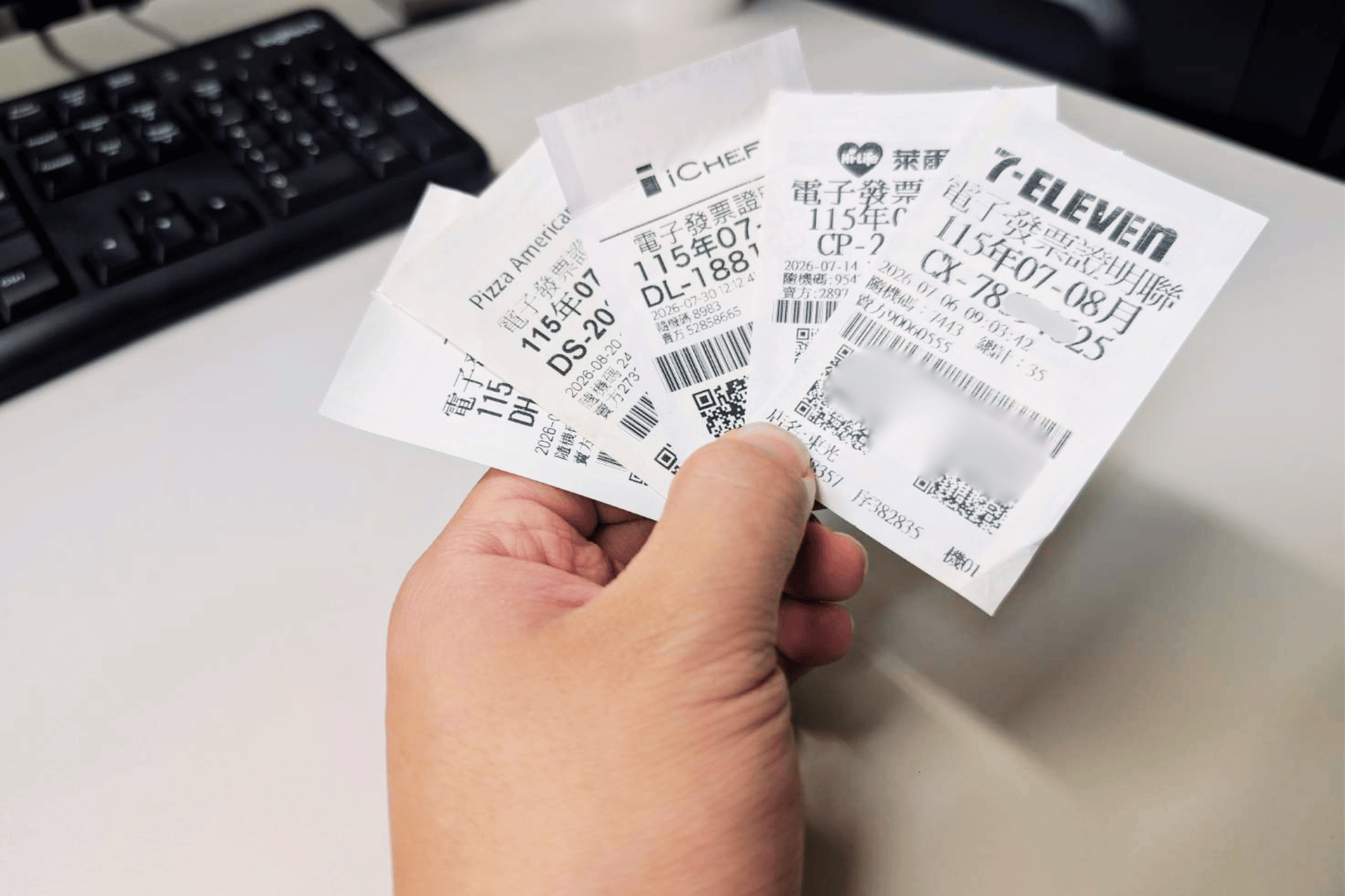

(FWA 2026/8/21)Welcome to the Taiwan Receipt Lottery and daily use guide! In Taiwan, keeping your receipts is more than just tracking purchases—it’s a chance to win big every two months. Officially known as the Uniform Invoice Lottery, this system is open to citizens, New Immigrants, and expats alike. By following our easy official APP tutorial to register a mobile barcode, you can seamlessly store cloud invoices, unlock exclusive prize draws, and set up automatic cash remittances so you never miss a winning prize!
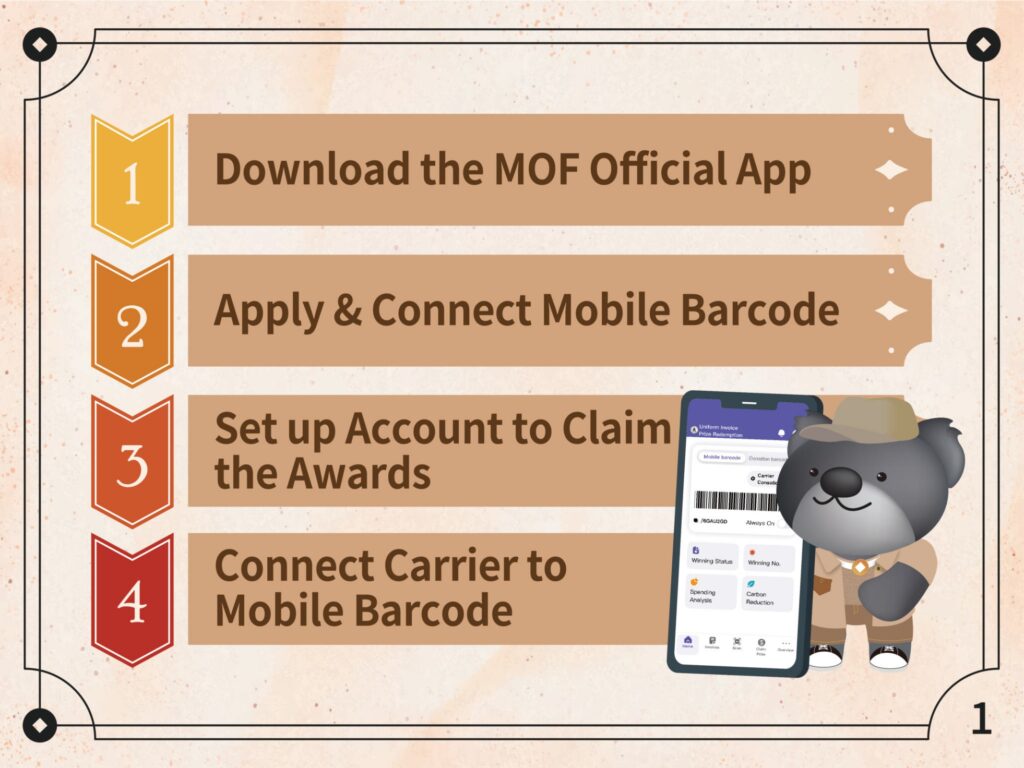
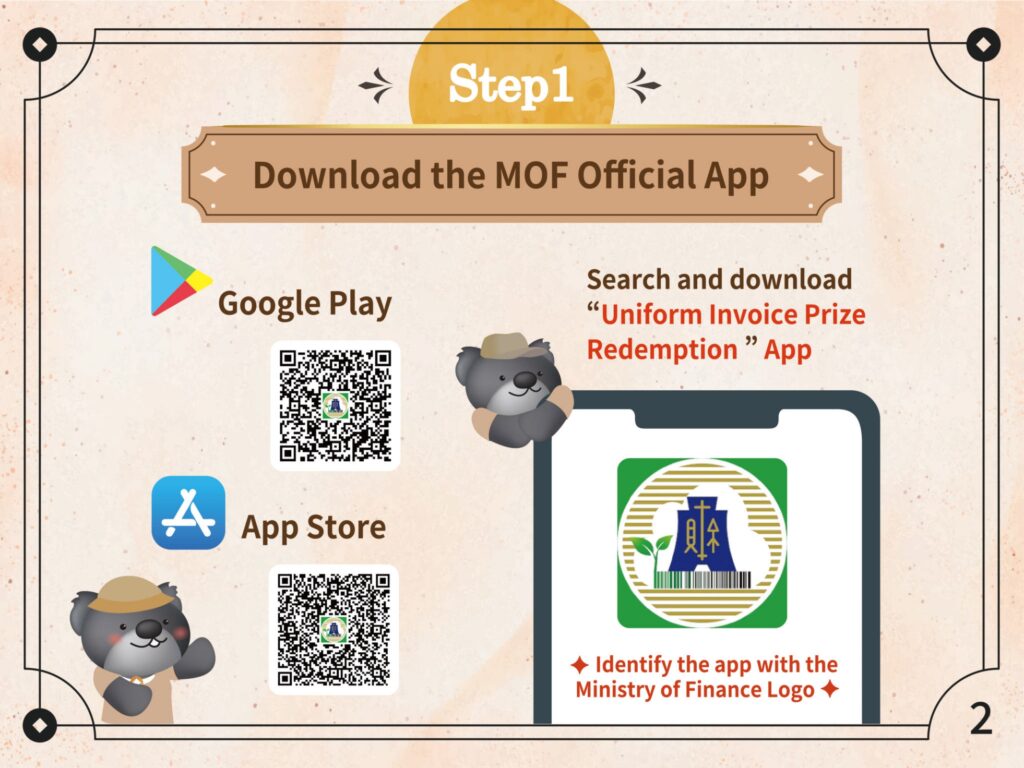
Step 1: Download the Official Redemption APP
Open Google Play or the App Store, search for, and download the “Uniform Invoice Prize Redemption” App.
Ensure you are downloading the correct application by identifying the app with the official Ministry of Finance Logo.
Step 2: Apply & Register Your Mobile Barcode
Open the App. If you already have an existing mobile barcode, choose the “With a Mobile Barcode” option. Enter your phone number and password to connect your mobile barcode to the app.
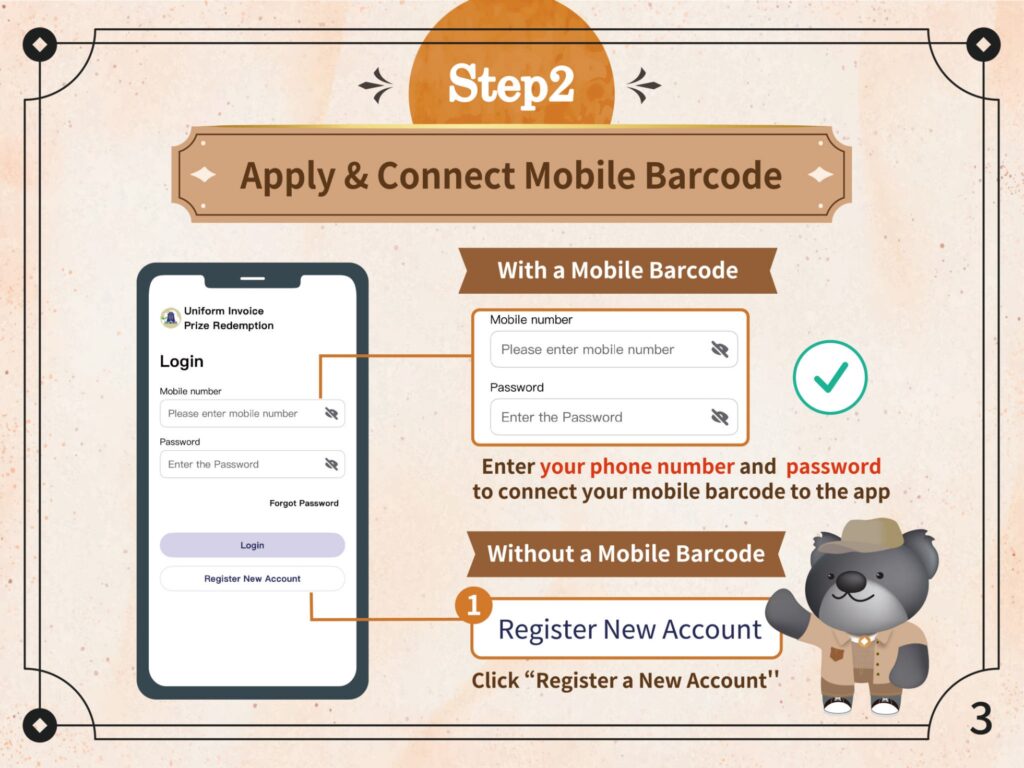
- If you are a first-time user without a mobile barcode, choose the “Without a Mobile Barcode” option and click “Register New Account”.
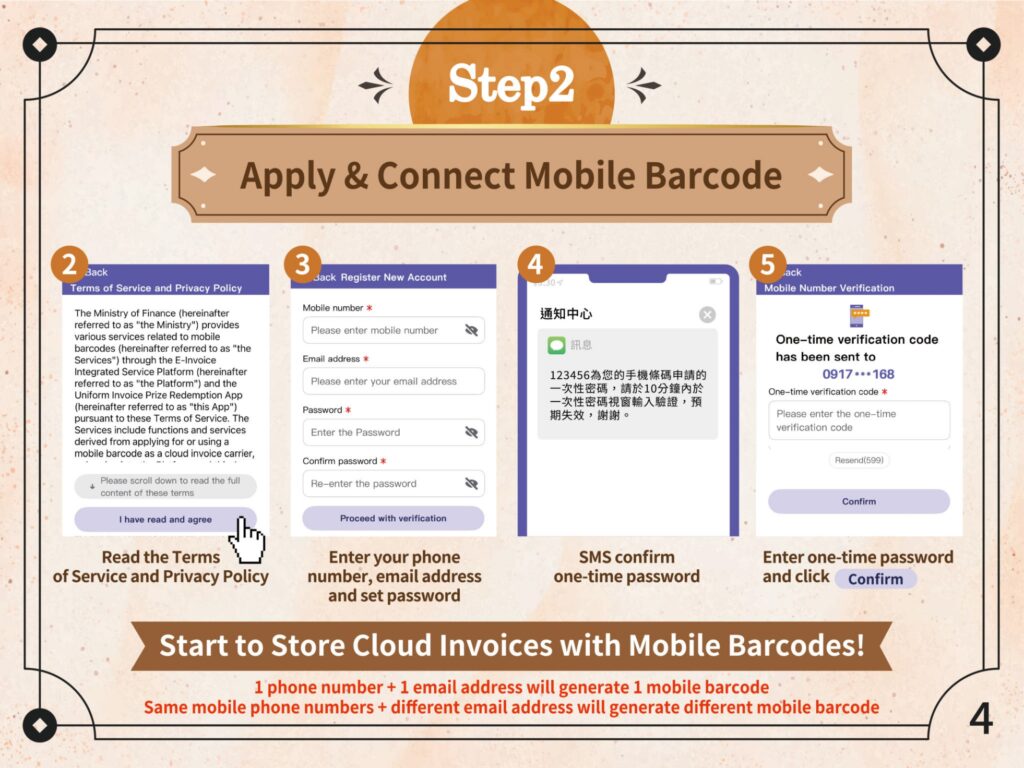
Read the Terms of Service and Privacy Policy, then click “I have read and agree”.
Enter your phone number, email address, and set a password, then click “Proceed with verification”.
Check your SMS for the one-time password, enter it into the app, and click “Confirm”.
Note: 1 phone number combined with 1 email address will generate 1 mobile barcode. Using the same mobile phone number with a different email address will generate a different mobile barcode.
Step 3: Set Up Account to Claim the Awards (Automatic Remittance)
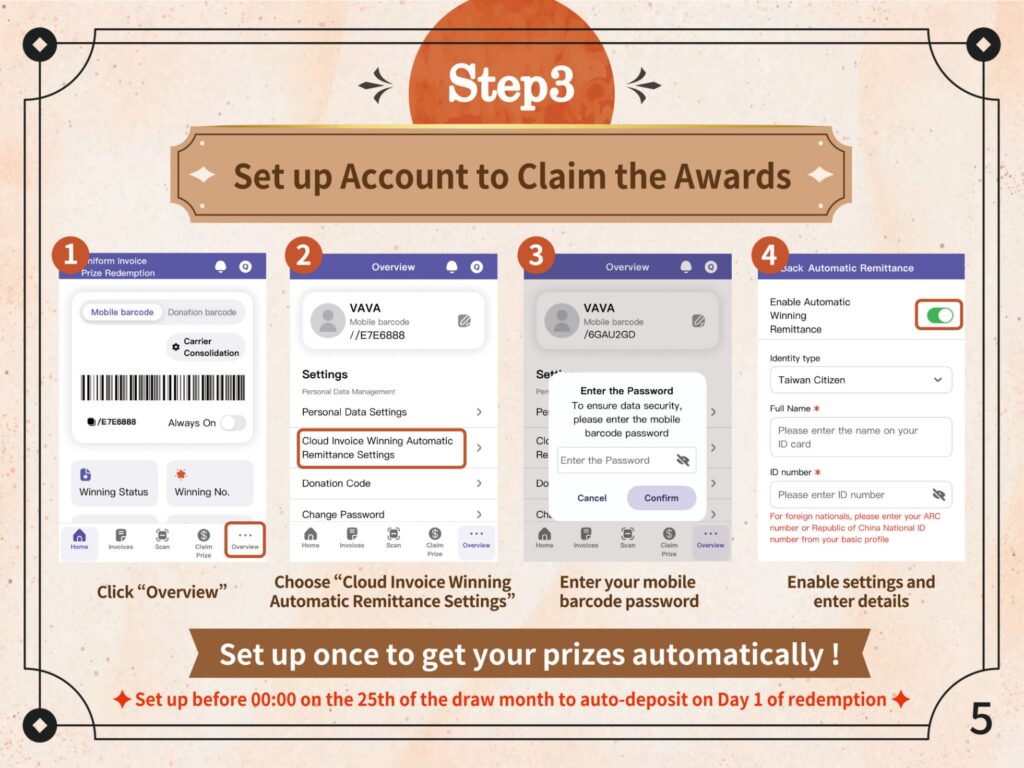
Click “Overview” at the bottom menu of the app.
Choose “Cloud Invoice Winning Automatic Remittance Settings”.
To ensure data security, enter your mobile barcode password and click “Confirm”.
Enable the “Automatic Winning Remittance” toggle. Select your identity type, enter your full name, and your ID number (foreign nationals should enter their ARC number or Republic of China National ID number from their basic profile).
Set this up once before 00:00 on the 25th of the draw month to auto-deposit on Day 1 of redemption!
Step 4: Connect Carrier to Mobile Barcode (Carrier Consolidation)
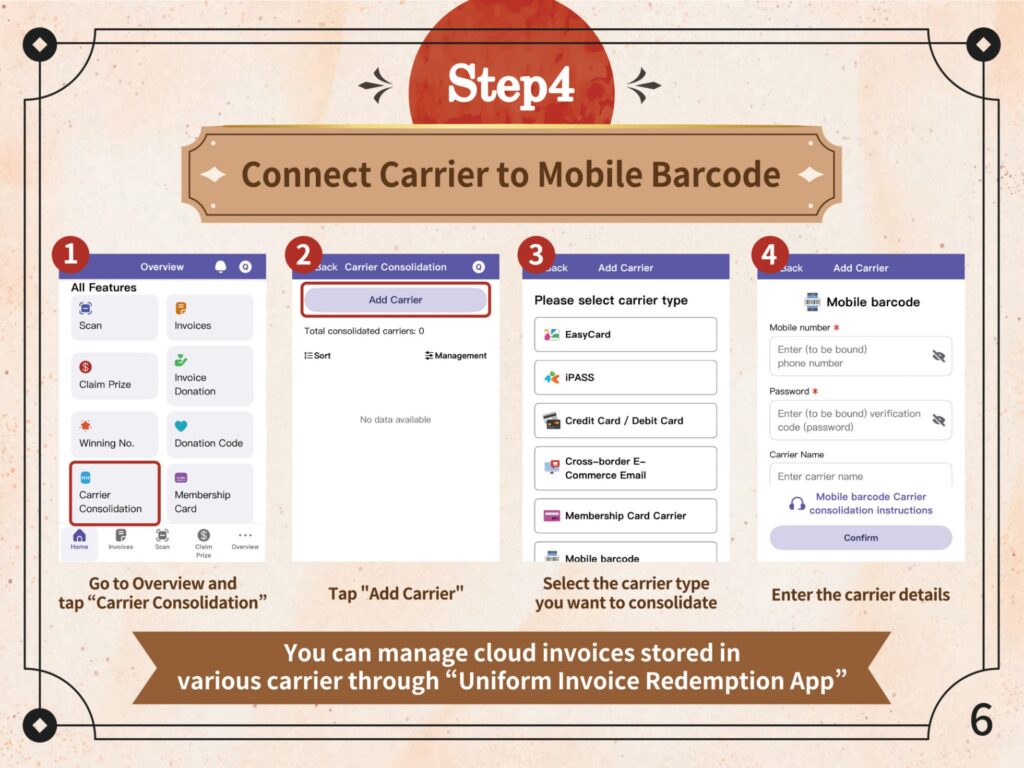
Go to “Overview” and tap “Carrier Consolidation”.
Tap the “Add Carrier” button.
Select the carrier type you want to consolidate (options include EasyCard, iPASS, Credit Card / Debit Card, Cross-border E-Commerce Email, and Membership Card Carrier).
Enter the required carrier details to complete the setup.
By doing this, you can seamlessly manage cloud invoices stored in various carriers directly through the “Uniform Invoice Redemption App”.
You are All Set! How to Use Your Mobile Barcode in Daily Scenarios
Now that you have mastered the 4 steps, here is a quick reminder on how you can use your barcode to save invoices to your carrier during everyday activities:
Convenience Stores & Supermarkets: Before paying, open the App to show your barcode and tell the cashier “I want to scan my carrier” (我要刷載具 – Wǒ yào shuā zǎijù).
Self-Service Kiosks (e.g., McDonald’s): When checking out, select the “Carrier” (載具) or “Mobile Barcode” (手機條碼) option on the screen. Place your phone’s barcode under the machine’s red scanner.
Food Delivery & E-commerce (e.g., UberEats, Foodpanda): In the app’s settings or on the checkout page under “Invoice Information” (發票資訊), select “Mobile Barcode” (手機條碼) and manually type your unique barcode string (starting with a “/”).
Taiwan Receipt Lottery Official APP Guide: I-rehistro ang Iyong Mobile Barcode sa APP at Huwag Palampasin ang Panalo!
(FWA 2026/8/21) Maligayang pagdating sa Taiwan Receipt Lottery at gabay sa pang-araw-araw na paggamit! Sa Taiwan, ang pagtatago ng mga resibo ay hindi lamang para sa tracking—ito ay isang pagkakataon para manalo tuwing ikalawang buwan. Opisyal na kilala bilang Uniform Invoice Lottery, ang sistemang ito ay bukas para sa mga mamamayan, New Immigrants, at mga expats. Sundin ang aming madaling gabay sa opisyal na APP upang irehistro ang iyong mobile barcode, madaling maiimbak ang mga cloud invoice, makasali sa mga eksklusibong draw, at i-set up ang awtomatikong pagpapadala ng premyo nang hindi mo na mapapalampas ang iyong panalo!
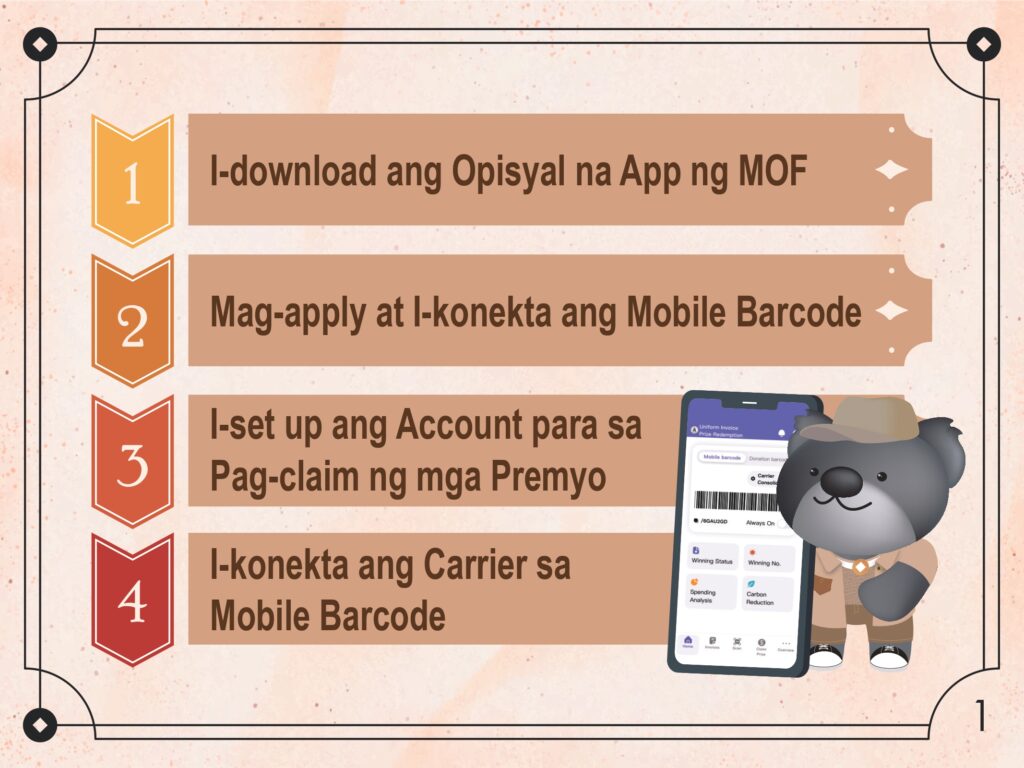
Hakbang 1: I-download ang Official Redemption APP
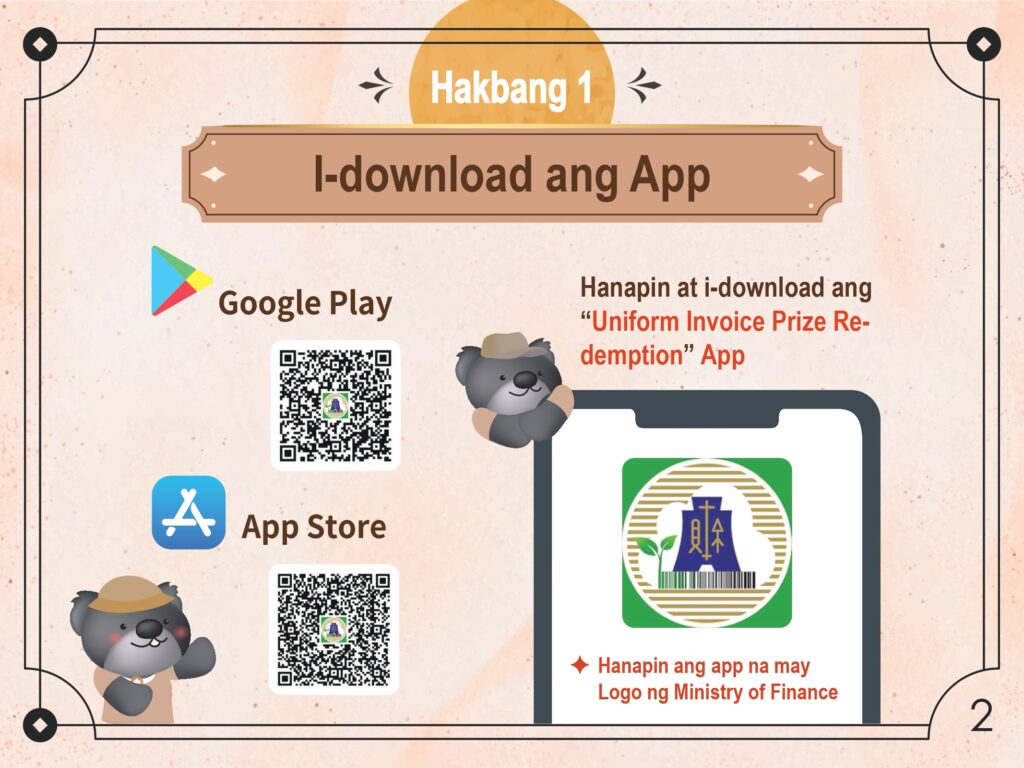
- Buksan ang Google Play o ang App Store, hanapin, at i-download ang “Uniform Invoice Prize Redemption” App.
- Tiyaking dina-download mo ang tamang aplikasyon sa pamamagitan ng pagkilala sa app na may opisyal na Logo ng Ministry of Finance.
Hakbang 2: Mag-apply at Irehistro ang Iyong Mobile Barcode
Buksan ang App.
- Kung mayroon ka nang umiiral na mobile barcode, piliin ang opsyong “With a Mobile Barcode”.
- Ilagay ang iyong numero ng telepono at password para i-konekta ang iyong mobile barcode sa app.
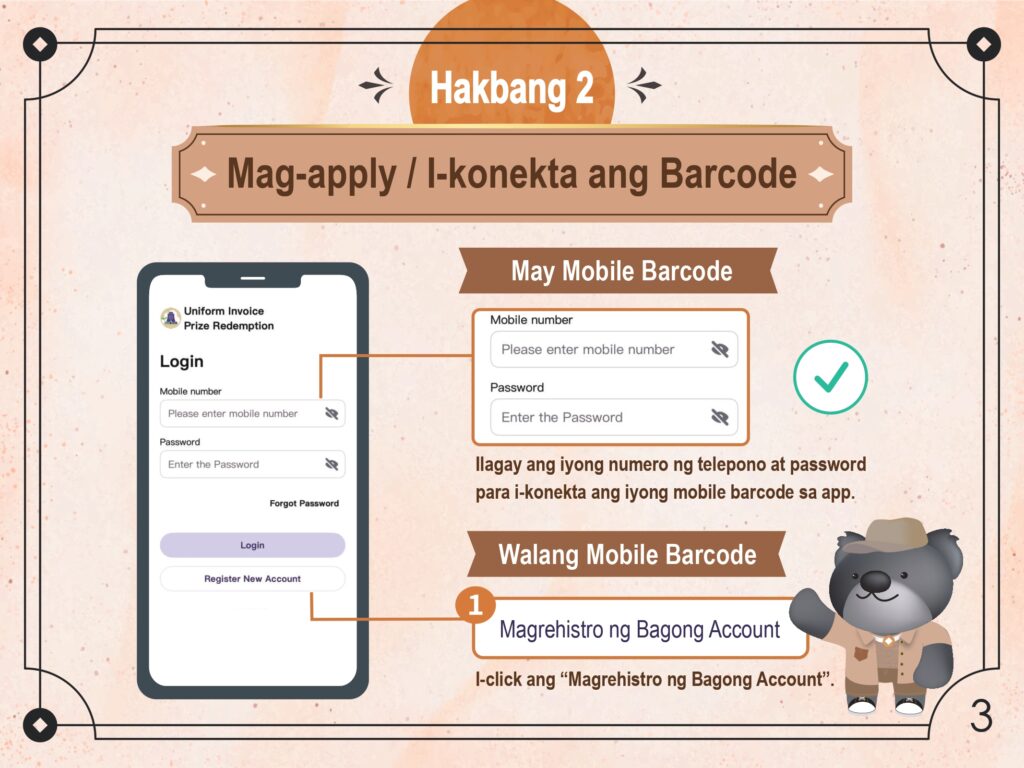
Kung ikaw ay unang beses gagamit na walang mobile barcode, piliin ang opsyong “Without a Mobile Barcode” at i-click ang “Register New Account”.
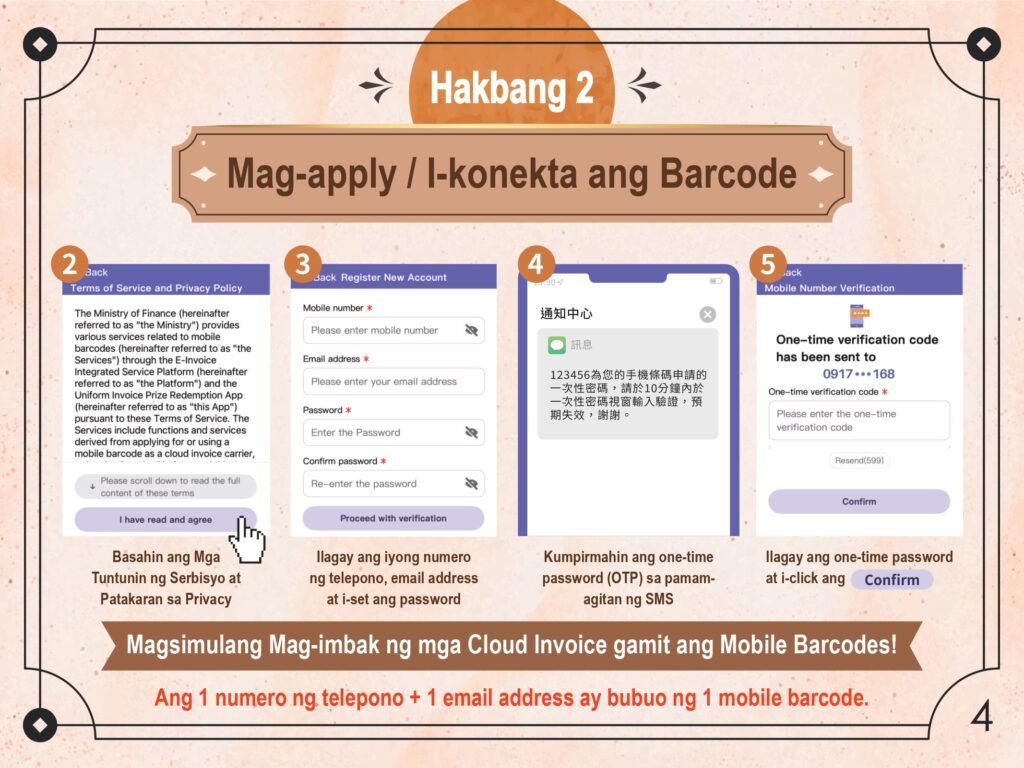
Basahin ang Mga Tuntunin ng Serbisyo at Patakaran sa Privacy, pagkatapos ay i-click ang “I have read and agree”.
Ilagay ang iyong numero ng telepono, email address, at magtakda ng password, pagkatapos ay i-click ang “Proceed with verification”.
Suriin ang iyong SMS para sa one-time password, ilagay ito sa app, at i-click ang “Confirm”.
Note: Ang 1 numero ng telepono na pinagsama sa 1 email address ay bubuo ng 1 mobile barcode. Ang paggamit ng parehong numero ng telepono na may ibang email address ay bubuo ng ibang mobile barcode.
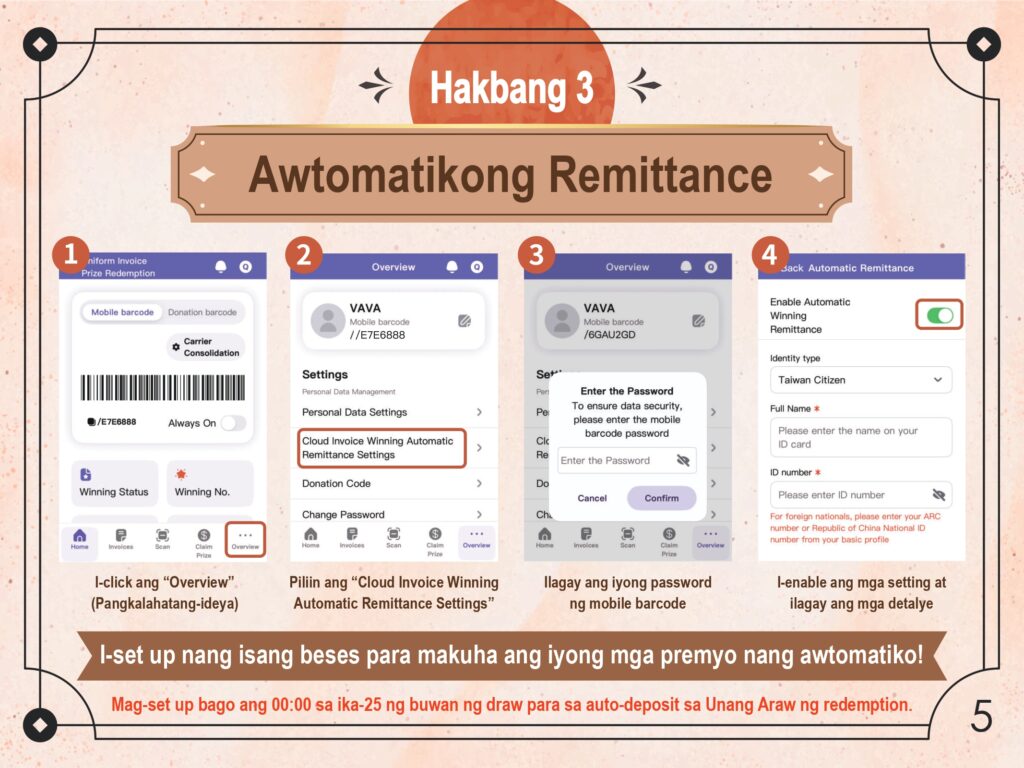
Hakbang 3: I-set Up ang Account para sa Pag-claim ng mga Premyo (Awtomatikong Remittance)
I-click ang “Overview” sa ibabang menu ng app.
Piliin ang “Cloud Invoice Winning Automatic Remittance Settings”.
Para matiyak ang seguridad ng data, ilagay ang iyong password ng mobile barcode at i-click ang “Confirm”.
I-enable ang toggle ng “Automatic Winning Remittance”. Piliin ang iyong uri ng pagkakakilanlan (identity type), ilagay ang iyong buong pangalan, at ang iyong ID number (dapat ilagay ng mga foreign nationals ang kanilang ARC number o Taiwan National ID number mula sa kanilang basic profile).
I-set up ito nang minsan bago ang 00:00 sa ika-25 ng buwan ng draw para sa auto-deposit sa Unang Araw ng redemption!
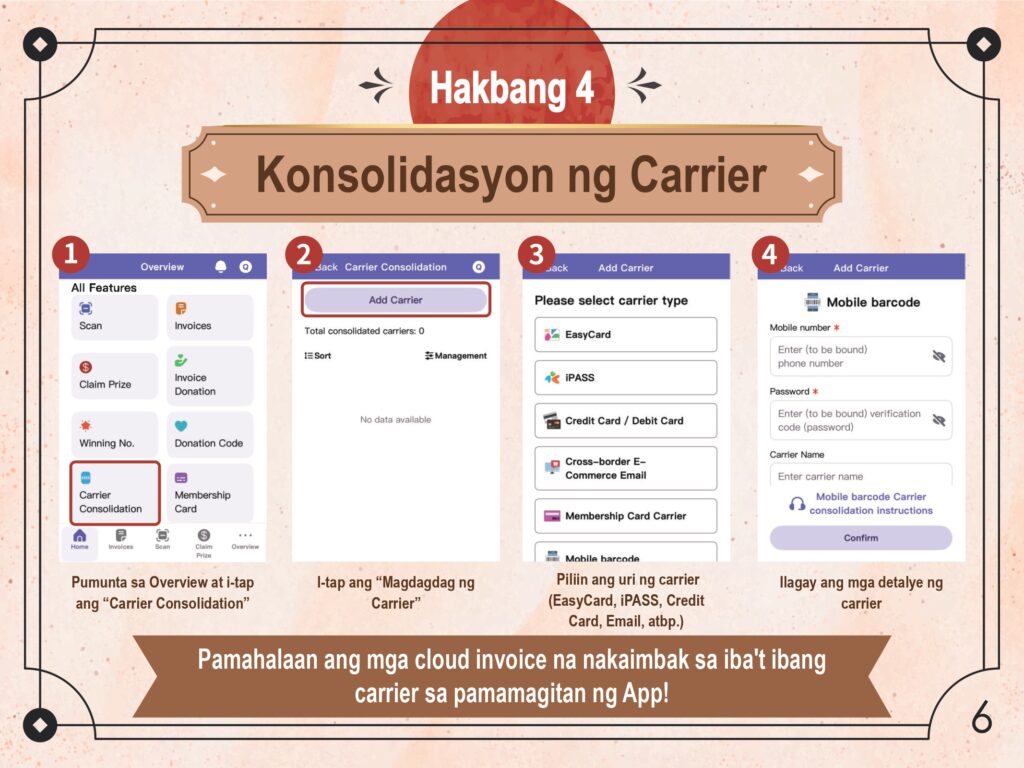
Hakbang 4: I-konekta ang Carrier sa Mobile Barcode (Konsolidasyon ng Carrier)
Pumunta sa “Overview” at i-tap ang “Carrier Consolidation”.
I-tap ang “Add Carrier” button.
Piliin ang uri ng carrier na gusto mong konsolidahin (kasama sa mga opsyon ang EasyCard, iPASS, Credit Card / Debit Card, Cross-border E-Commerce Email, at Membership Card Carrier).
Ilagay ang mga kinakailangang detalye ng carrier para makumpleto ang setup.
Sa pamamagitan nito, madali mong mapapamahalaan ang mga cloud invoice na nakaimbak sa iba’t ibang carrier nang direkta sa pamamagitan ng “Uniform Invoice Redemption App”.
Handa Ka Na! Paano Gamitin ang Iyong Mobile Barcode sa Pang-araw-araw na Senaryo
Ngayong alam mo na ang 4 na hakbang, narito ang isang mabilis na paalala kung paano mo magagamit ang iyong barcode para mag-imbak ng mga invoice sa iyong carrier sa mga pang-araw-araw na gawain:
Convenience Stores & Supermarkets: Bago magbayad, buksan ang App para ipakita ang iyong barcode at sabihin sa cashier “I want to scan my carrier” (我要刷載具 – Wǒ yào shuā zǎijù).
Self-Service Kiosks (hal., McDonald’s): Kapag magbabayad na, piliin ang “Carrier” (載具) o “Mobile Barcode” (手機條碼) option sa screen. Ilagay ang barcode ng iyong telepono sa ilalim ng red scanner ng makina.
Food Delivery & E-commerce (hal., UberEats, Foodpanda): Sa settings ng app o sa checkout page sa ilalim ng “Invoice Information” (發票資訊), piliin ang “Mobile Barcode” (手機條碼) at i-type nang mano-mano ang iyong natatanging barcode string (nagsisimula sa “/”).